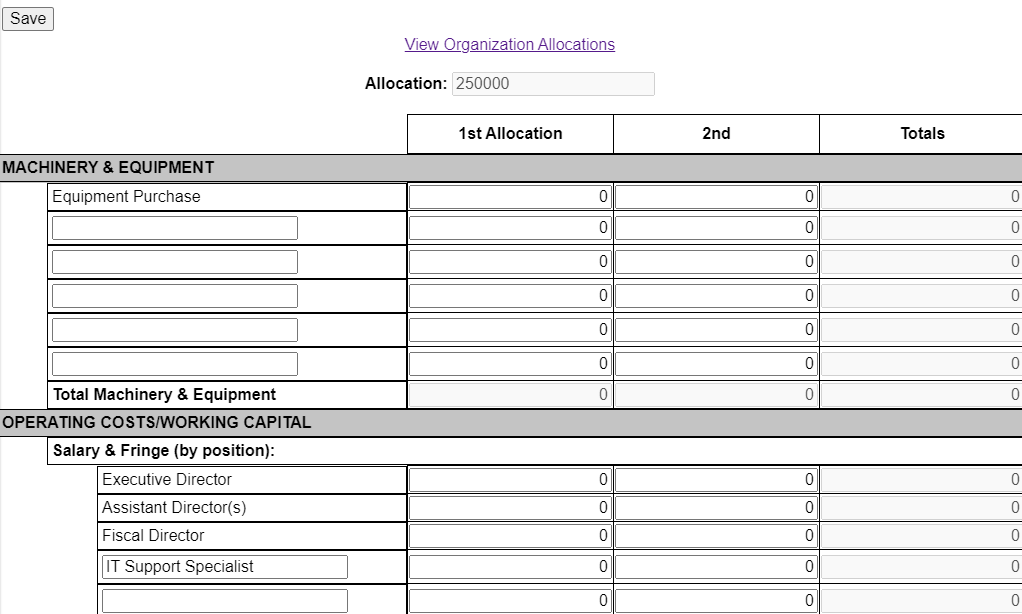
The agency’s CSBG Budget allocation amount displays at the top of the Budget screen. Selecting the View Organization Allocations link allows you to view the report year’s total allocation and each PA agency’s budget allocation(s).
A column displays to enter for the agency’s planned expenditures in each budget area. As numbers are entered in this column, the associated Totals column increases by the same amount. Totals display for each budget section (i.e., Total Machinery & Equipment) and for the Total CSBG Program. As needed, a description can be entered on a blank line in any section along with an allocated amount as appropriate.
The Total CSBG Program amounts will display highlighted in red until the totals = your agency Allocation amount. Once the totals are equal, the totals will display highlighted in green and will change the Work Plan Budget status from Incomplete to Complete.
If additional Federal funding is received within the program year, DCED will create another Allocation and assign each agency their allocation of the funding. When submitted to the agencies, an e-mail notification is sent to the Agency ED, Local Admins, and any User with Work Plan access along with a dashboard alert provided to these users. At this point, your agency should update their Work Plan Budget information. A 2nd allocation column will display for entry of the additional funding allocations. Other sections of your agency’s Work Plan should also be updated as needed to account for the additional funding allocation.